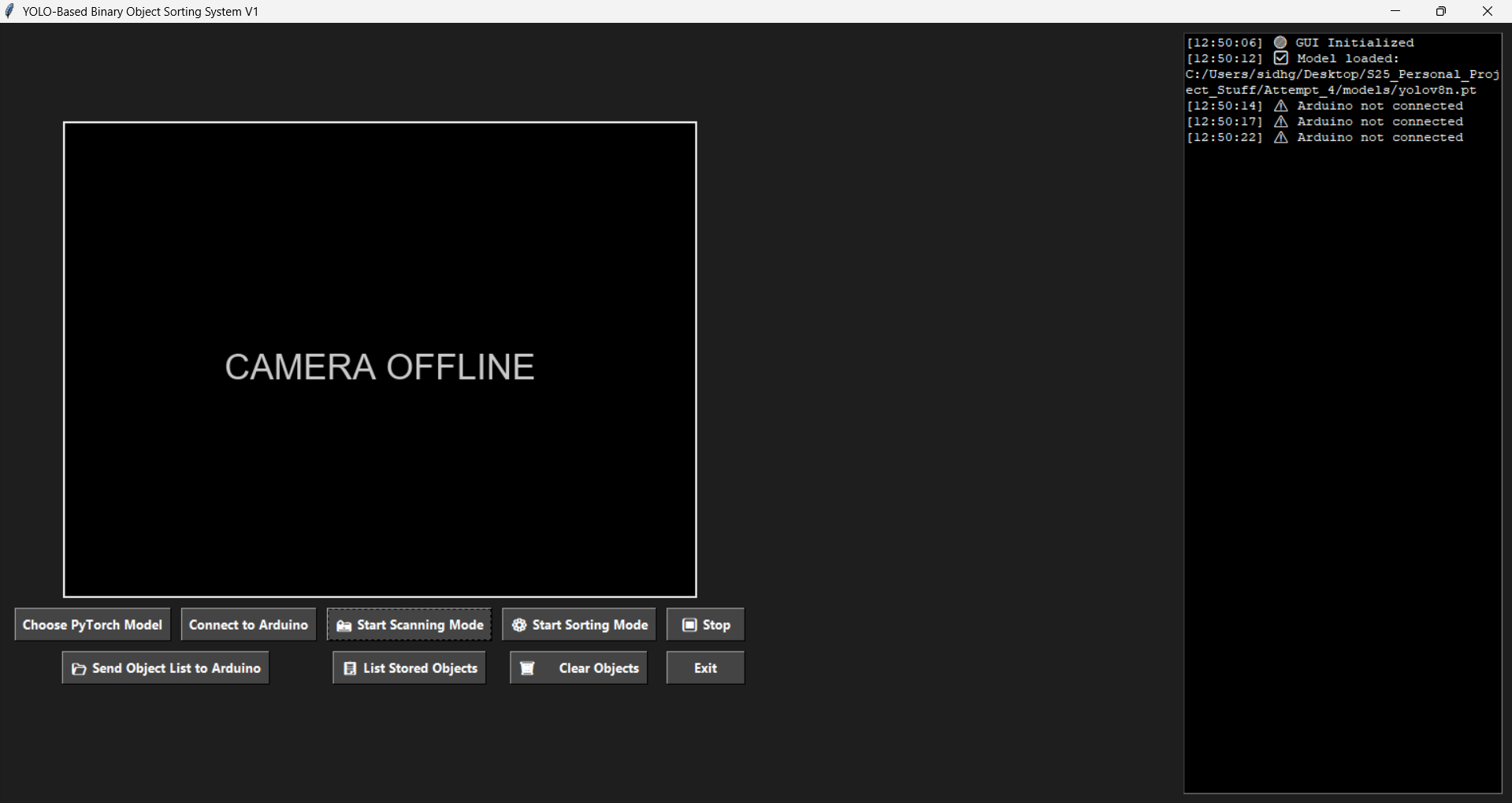
import tkinter as tk
from tkinter import ttk, filedialog
from PIL import Image, ImageTk
import cv2
from ultralytics import YOLO
import csv
import os
import serial
import threading
from datetime import datetime
import serial.tools.list_ports
import time
import csv
from PIL import ImageDraw, ImageFont

# ---------------------------
# CONFIGURATION
# ---------------------------
CAMERA_INDEX = 0
WINDOW_TITLE = "YOLO-Based Binary Object Sorting System V1"
WINDOW_BG_COLOR = "#1e1e1e"
FRAME_RATE_MS = 15
LOG_DIR = "logs"

# ---------------------------
# Ensure Logs Folder Exists
# ---------------------------
os.makedirs(LOG_DIR, exist_ok=True)

def generate_csv_name():
    now = datetime.now()
    return f"{LOG_DIR}/scan_log_{now.strftime('%Y-%m-%d_%H-%M-%S')}.csv"

# ---------------------------
# Connection to Arduino
# ---------------------------

def find_arduino_port():
    ports = serial.tools.list_ports.comports()
    for port in ports:
        if "Leonardo" in port.description or (port.vid == 0x2341 and port.pid == 0x8036):
            return port.device
    return None

def reset_arduino_before_exit(port):
    try:
        ser = serial.Serial(port, 1200)
        ser.close()
        print("🛑 Arduino reset triggered")
        time.sleep(2)  # wait for Arduino to fully reset
    except Exception as e:
        print(f"⚠️ Could not reset Arduino: {e}")

def get_unique_classes_from_csv(path):
    unique_classes = set()
    try:
        with open(path, newline='') as f:
            reader = csv.reader(f)
            for row in reader:
                if len(row) >= 2:
                    unique_classes.add(row[1])
    except Exception as e:
        print(f"Error reading CSV: {e}")
    return list(unique_classes)

def send_objects_to_eeprom(item_list, arduino_serial):
    try:
        # Create comma-separated string
        object_string = ",".join(item_list[:20])  # Limit to 20 items

        # Send the command
        command = f"STORE_OBJECTS:{object_string}\n"
        arduino_serial.write(command.encode())

        print(f"✅ Sent {len(item_list)} objects to Arduino EEPROM")
        return True

    except Exception as e:
        print(f"❌ Failed to send objects: {e}")
        return False

# ---------------------------
# GUI Class
# ---------------------------
class YOLOApp:
    def __init__(self, root):
        self.root = root
        self.root.title(WINDOW_TITLE)
        self.root.configure(bg=WINDOW_BG_COLOR)
        self.arduino = None

        self.cap = cv2.VideoCapture(CAMERA_INDEX)
        if not self.cap.isOpened():
            raise RuntimeError("❌ Cannot open webcam")

        self.is_running = False
        self.mode = None  # 'scan' or 'sort'
        self.csv_file = None
        self.detected_classes = set()
        self.model_path = ""
        self.model = None
        self.arduino_ready_to_sort = False

        # Layout frames
        main_frame = tk.Frame(root, bg=WINDOW_BG_COLOR)
        main_frame.pack(fill=tk.BOTH, expand=True)

        left_frame = tk.Frame(main_frame, bg=WINDOW_BG_COLOR)
        left_frame.pack(side=tk.LEFT, padx=10, pady=10)

        right_frame = tk.Frame(main_frame, bg=WINDOW_BG_COLOR)
        right_frame.pack(side=tk.RIGHT, padx=10, pady=10, fill=tk.Y)

        # Video Frame
        self.video_frame = tk.Label(left_frame)
        self.video_frame.pack()

        # Create a black placeholder with text "Camera Offline"
        placeholder = Image.new("RGB", (640, 480), (0, 0, 0))
        draw = ImageDraw.Draw(placeholder)

        try:
            font = ImageFont.truetype("arial.ttf", 36)
        except:
            font = ImageFont.load_default()

        text = "CAMERA OFFLINE"
        bbox = draw.textbbox((0, 0), text, font=font)
        text_width = bbox[2] - bbox[0]
        text_height = bbox[3] - bbox[1]
        position = ((640 - text_width) // 2, (480 - text_height) // 2)
        draw.text(position, text, fill=(200, 200, 200), font=font)

        self.placeholder_img = ImageTk.PhotoImage(placeholder)
        self.video_frame.configure(image=self.placeholder_img)
        self.video_frame.imgtk = self.placeholder_img

        # Control Buttons
        btn_frame = tk.Frame(left_frame, bg=WINDOW_BG_COLOR)
        btn_frame.pack(pady=10)

        self.choose_model_btn = ttk.Button(btn_frame, text="Choose PyTorch Model", command=self.choose_model)
        self.choose_model_btn.grid(row=0, column=0, padx=5)

        self.arduino_btn = ttk.Button(btn_frame, text="Connect to Arduino", command=self.connect_to_arduino)
        self.arduino_btn.grid(row=0, column=1, padx=5)

        self.scan_btn = ttk.Button(btn_frame, text="📸 Start Scanning Mode", command=self.start_scanning_mode)
        self.scan_btn.grid(row=0, column=2, padx=5)

        self.sort_btn = ttk.Button(btn_frame, text="⚙️ Start Sorting Mode", command=self.start_sorting_mode)
        self.sort_btn.grid(row=0, column=3, padx=5)

        self.stop_btn = ttk.Button(btn_frame, text="⏹ Stop", command=self.stop_detection)
        self.stop_btn.grid(row=0, column=4, padx=5)

        # Second row of buttons
        self.send_list_btn = ttk.Button(btn_frame, text="📂 Send Object List to Arduino", command=self.send_object_list)
        self.send_list_btn.grid(row=1, column=0, columnspan=2, pady=10, padx=5)

        self.list_objects_btn = ttk.Button(btn_frame, text="📋 List Stored Objects", command=self.list_stored_objects)
        self.list_objects_btn.grid(row=1, column=2, padx=5)

        self.clear_objects_btn = ttk.Button(btn_frame, text="🗑️ Clear Objects", command=self.clear_stored_objects)
        self.clear_objects_btn.grid(row=1, column=3, padx=5)

        exit_button = ttk.Button(btn_frame, text="Exit", command=self.exit_app)
        exit_button.grid(row=1, column=4, padx=5)

        # Output Log
        self.log_text = tk.Text(right_frame, width=40, height=30, bg="black", fg="white", wrap=tk.WORD)
        self.log_text.pack(fill=tk.BOTH, expand=True)
        self.log("🟢 GUI Initialized")

        # ---------------------------
        # 🎨 Button Styling
        # ---------------------------
        style = ttk.Style()
        style.theme_use("default")
        style.configure("TButton", background="#444", foreground="white", padding=6, font=("Segoe UI", 10, "bold"))
        style.map("TButton", background=[("active", "#777")])

    # ---------------------------
    # 🧾 Log Output
    # ---------------------------
    def log(self, message):
        timestamp = datetime.now().strftime("[%H:%M:%S]")
        self.log_text.insert(tk.END, f"{timestamp} {message}\n")
        self.log_text.see(tk.END)

    # ---------------------------
    # 🚦 MODE SWITCHING
    # ---------------------------
    def start_scanning_mode(self):
        if self.mode == "scan":
            self.stop_detection()
            return

        if self.model is None:
            self.log("⚠️ No model selected")
            return
        if self.arduino is None or not self.arduino.is_open:
            self.log("⚠️ Arduino not connected")
            return

        self.stop_detection()
        self.mode = "scan"
        self.scan_btn.config(text="⏹ Stop Scanning Mode", state=tk.NORMAL)
        self.sort_btn.config(state=tk.DISABLED)
        self.csv_file = generate_csv_name()
        self.detected_classes.clear()
        self.log(f"📄 Logging to: {self.csv_file}")
        self.is_running = True
        self.update_frame()

    def start_sorting_mode(self):
        if self.mode == "sort":
            self.stop_detection()
            return
        if self.model is None:
            self.log("⚠️ No model selected")
            return
        if self.arduino is None or not self.arduino.is_open:
            self.log("⚠️ Arduino not connected")
            return
        if not self.arduino_ready_to_sort:
            self.log("❌ Arduino is not ready. Send object list first.")
            return
        self.stop_detection()
        self.mode = "sort"
        self.sort_btn.config(text="⏹ Stop Sorting Mode", state=tk.NORMAL)
        self.scan_btn.config(state=tk.DISABLED)
        self.log("⚙️ Sorting mode active")
        self.is_running = True
        self.update_frame()

    def stop_detection(self):
        self.is_running = False
        was_sorting = (self.mode == "sort")  # Remember if we were sorting
        self.mode = None
        self.video_frame.configure(image=self.placeholder_img)
        self.video_frame.imgtk = self.placeholder_img
        self.scan_btn.config(text="📸 Start Scanning Mode", state=tk.NORMAL)
        self.sort_btn.config(text="⚙️ Start Sorting Mode", state=tk.NORMAL)

        # Send stop command to Arduino
        self.send_to_arduino("stop")

        if was_sorting:
            self.log("🛑 Detection stopped - Sorting mode disabled")
        else:
            self.log("🛑 Detection stopped")

    def choose_model(self):
        if self.is_running:
            self.log("⚠️ Stop detection before loading a new model")
            return
        path = filedialog.askopenfilename(filetypes=[("PyTorch Model", "*.pt")])
        if path:
            self.model_path = path
            self.model = YOLO(self.model_path)
            self.log(f"✅ Model loaded: {self.model_path}")

    # ---------------------------
    # Frame Processing
    # ---------------------------
    def update_frame(self):
        if not self.is_running:
            return

        ret, frame = self.cap.read()
        if not ret:
            self.log("❌ Failed to grab frame - stopping detection")
            self.stop_detection()  # Auto-stop if camera fails
            return

        results = self.model(frame)[0]
        annotated = results.plot()

        if self.mode == "scan":
            self.handle_scanning_mode(results)
        elif self.mode == "sort":
            self.handle_sorting_mode(results)

        rgb_frame = cv2.cvtColor(annotated, cv2.COLOR_BGR2RGB)
        img = Image.fromarray(rgb_frame)
        imgtk = ImageTk.PhotoImage(image=img)
        self.video_frame.imgtk = imgtk
        self.video_frame.configure(image=imgtk)

        self.root.after(FRAME_RATE_MS, self.update_frame)

    # ---------------------------
    # Scanning Mode Logic
    # ---------------------------
    def handle_scanning_mode(self, results):
        self.send_to_arduino("scan")
        for box in results.boxes:
            cls_id = int(box.cls[0])
            class_name = self.model.names[cls_id]
            if class_name not in self.detected_classes:
                self.detected_classes.add(class_name)
                with open(self.csv_file, 'a', newline='') as f:
                    writer = csv.writer(f)
                    writer.writerow([datetime.now().isoformat(), class_name])
                self.log(f"📝 Logged: {class_name}")

    # ---------------------------
    # Sorting Mode Logic
    # ---------------------------
    def handle_sorting_mode(self, results):
        self.send_to_arduino("sort")
        for box in results.boxes:
            cls_id = int(box.cls[0])
            class_name = self.model.names[cls_id]
            self.log(f"📦 Detected for sorting: {class_name}")
            # Send the detected class to Arduino
            self.send_to_arduino(class_name)
            break

    # ---------------------------
    # Arduino Communication
    # ---------------------------

    def connect_to_arduino(self):
        port = find_arduino_port()
        if port:
            try:
                self.arduino = serial.Serial(port, 9600, timeout=2)
                self.log(f"🟡 Connecting to Arduino on {port}...")

                time.sleep(2)  # Allow time for Arduino to reset and send handshake

                # Wait for "READY"
                start_time = time.time()
                ready_line = ""
                while time.time() - start_time < 5:
                    if self.arduino.in_waiting > 0:
                        ready_line = self.arduino.readline().decode().strip()
                        if ready_line == "READY":
                            break
                        elif ready_line:  # Any other message from Arduino
                            self.log(f"Arduino: {ready_line}")

                if ready_line == "READY":
                    self.log("✅ Arduino is ready!")
                    self.arduino_btn.config(text="Arduino Connected!", state=tk.DISABLED)

                    # Start listening thread for Arduino messages
                    self.start_arduino_listener()
                else:
                    self.log(f"❌ Unexpected handshake message: {ready_line}")
            except serial.SerialException as e:
                self.log(f"❌ Connection Failed: {str(e)}")
        else:
            self.log("⚠️ No Arduino found!")

    def start_arduino_listener(self):
        """Start a background thread to listen for Arduino messages"""
        def listen():
            while self.arduino and self.arduino.is_open:
                try:
                    if self.arduino.in_waiting > 0:
                        message = self.arduino.readline().decode().strip()
                        if message:
                            if message == "READY_TO_SORT":
                                self.arduino_ready_to_sort = True
                                self.log("🟢 Arduino ready to sort!")
                            else:
                                self.log(f"Arduino: {message}")
                    time.sleep(0.1)
                except Exception as e:
                    if self.arduino and self.arduino.is_open:
                        self.log(f"Error reading from Arduino: {e}")
                    break

        listener_thread = threading.Thread(target=listen, daemon=True)
        listener_thread.start()

    def send_to_arduino(self, message):
        try:
            if self.arduino and self.arduino.is_open:
                self.arduino.write((message + "\n").encode())
        except Exception as e:
            self.log(f"❌ Error sending to Arduino: {e}")

    def send_object_list(self):
        """Send object list to Arduino EEPROM"""
        if self.arduino is None or not self.arduino.is_open:
            self.log("⚠️ Arduino must be connected before sending list")
            return

        filepath = filedialog.askopenfilename(filetypes=[("CSV Files", "*.csv")])
        if not filepath:
            self.log("⚠️ No file selected")
            return

        classes = get_unique_classes_from_csv(filepath)
        if not classes:
            self.log("⚠️ No valid objects found in CSV")
            return

        self.log(f"📤 Sending {len(classes)} objects to Arduino EEPROM...")

        if send_objects_to_eeprom(classes, self.arduino):
            self.log(f"✅ Sent {len(classes)} objects: {', '.join(classes)}")
        else:
            self.log("❌ Send failed")

    def list_stored_objects(self):
        """Ask Arduino to list stored objects"""
        if self.arduino and self.arduino.is_open:
            self.send_to_arduino("LIST_OBJECTS")
        else:
            self.log("⚠️ Arduino not connected")

    def clear_stored_objects(self):
        """Clear objects from Arduino EEPROM"""
        if self.arduino and self.arduino.is_open:
            self.send_to_arduino("CLEAR_OBJECTS")
            self.arduino_ready_to_sort = False
            self.log("🗑️ Cleared stored objects")
        else:
            self.log("⚠️ Arduino not connected")

    def exit_app(self):
        if self.arduino and self.arduino.is_open:
            port = self.arduino.port
            self.arduino.close()
            self.clear_stored_objects()
            reset_arduino_before_exit(port)
        self.root.destroy()

# ---------------------------
# Run GUI
# ---------------------------
if __name__ == "__main__":
    root = tk.Tk()
    app = YOLOApp(root)
    root.mainloop()

    if app.cap.isOpened():
        app.cap.release()
    cv2.destroyAllWindows()